prepair for Processing
prepair for Processing integrates the prepair and pprepair tools into the QGIS Processing framework, allowing users to easily repair invalid geometries and produce valid planar partitions.
Installation
The plugin is available via my repository.
Prerequisites
prepair for Processing requires the prepair and pprepair tools to be installed on your system. These binaries should be accessible via your system’s PATH environment variable or their location should be configured in the plugin settings.
As there are no ready-to-use packages for prepair and pprepair, you will need to build them from sources. Compilation instructions can be found at:
- prepair: https://github.com/tudelft3d/prepair
- pprepair: https://github.com/tudelft3d/pprepair
To install it, please follow these steps (for more details, see the QGIS User Guide):
- Start QGIS.
- Go to Plugins → Manage and Install Plugins….
- Go to the Settings tab and click Add… to add a new repository.
- Enter repository name, e.g. “Alex Bruy’s plugins”.
- Enter the repository URL https://plugins.bruy.me/plugins.xml.
- Click OK to close the Repository details dialog.
- Go to the All tab.
- Search for prepair for Processing, select the plugin in the list and click Install Plugin.
Usage
Once installed and enabled, prepair for Processing is registered as a Processing provider and its algorithms are added to the Processing toolbox under the “prepair” group.
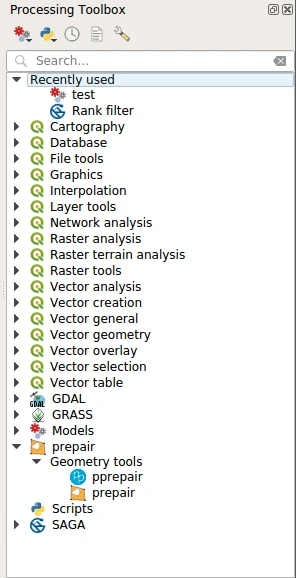
You may need to configure the provider before using its tools. Open QGIS options from the menu “Settings → Options” and go to the “Processing” tab. Expand the “Providers” group and find “prepair” sub-group, here you will find all settings related to the prepair provider.
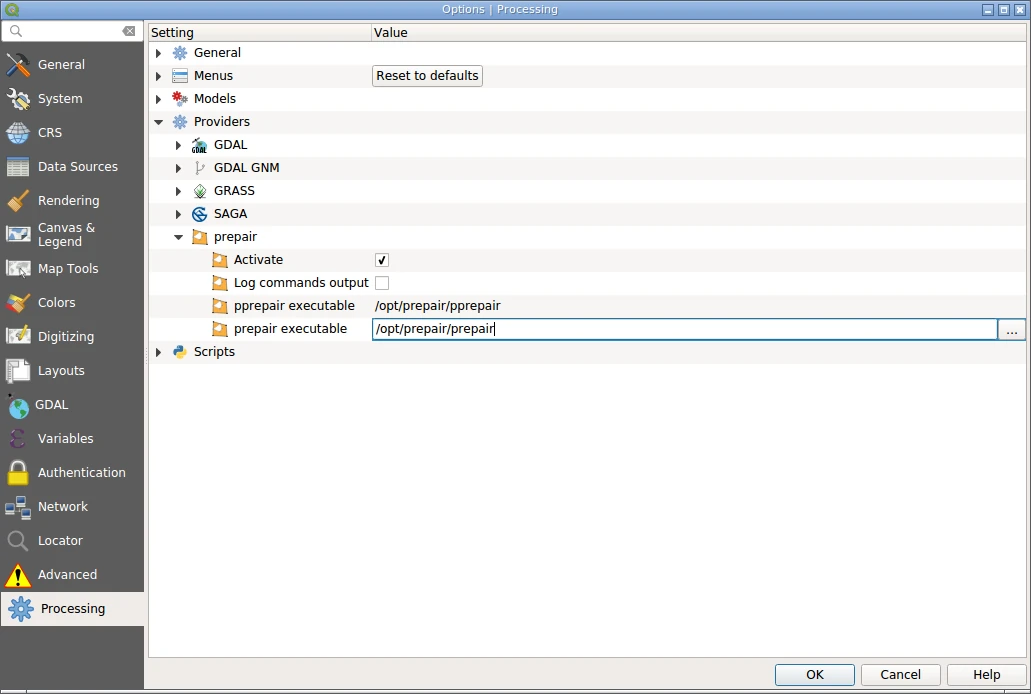
It is necessary to tell the plugin where to find prepair and pprepair executables. If these settings are left blank, the plugin will assume that the tools are already added to the system’s PATH environment variable and are accessible by name. When done, save settings by pressing OK.
The plugin provides two tools suitable for different cleaning goals:
- Repair polygons: Uses
prepairto fix single broken geometries (like self-intersections or dangling edges) according to ISO 19107 standards using constrained triangulation. - Repair planar partitions: Uses
pprepairto correct topological issues, ensuring that adjacent polygons form a valid planar partition without unwanted gaps or overlapping boundaries.
The algorithms can be used as any other Processing algorithm: in standalone mode, as a batch process, as part of models and scripts, or using the qgis_process command line tool. Please refer to the QGIS User Guide to learn how to use Processing tools.
Reporting bugs
Please report bugs and submit feature requests via bugtracker.
