I finally completed and published my translation of the PyQGIS Developer CookBook, a reference guide for Python developers who want to use the QGIS libraries. It is available as an online version and as a PDF for offline use.
The translation is not perfect (as my English is far from perfect) and will be improved gradually. I will keep the translation in sync with updates to the original PyQGIS CookBook.
Now I can start translating another manual, especially since I already have a candidate in mind. I won’t tell you which one. Out of spite. I will only say that it is also related to GIS.
MODIS Active Fire Product (MOD14) Science Processing Algorithm MOD14_SPA is an open-source implementation of the MODIS space imagery fire detection algorithm. You can find binary builds of the tool on NASA’s Direct Readout Laboratory (DRL) site, but only for some (rather old and 32-bit) Linux distributions. Fortunately, you can also download the source archive and build the tool yourself. In this post, I will show you how to do that.
Mayeul Kauffmann has done a great job comparing different ways to use OpenStreetMap (OSM) data in QGIS. He has also written a detailed guide on how to use OSM data to create beautiful, high-quality maps with routing support.
Here is a video demonstrating the use of QGIS and osm2postgresql.
Those interested in QGIS development are probably aware that at the last developers’ meeting, among other things, Martin Dobias and Radim Blazek presented the QGIS FileBrowser application for data management.
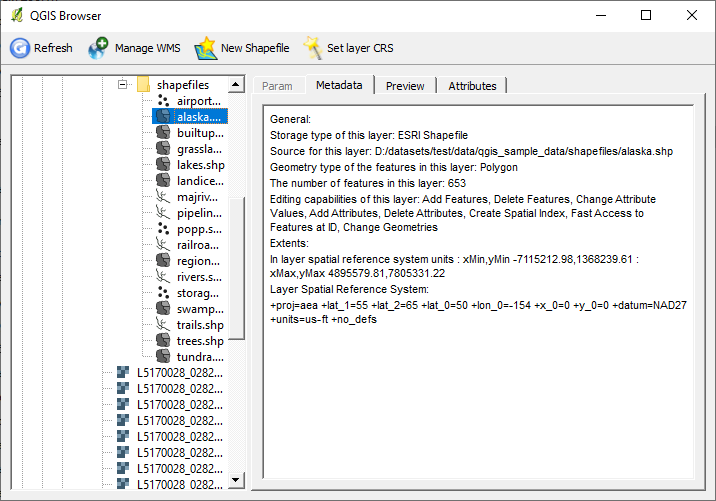
QGIS Browser
QGIS FileBrowser is based on the QGIS libraries. It supports the same vector and raster formats as QGIS and can also work with WMS servers (information about connections is taken from QGIS settings). The functionality is still quite poor, right now you can:
navigate through the file system or through the WMS server layers
preview data on a map, view attribute tables and metadata
manage WMS connections
create new shapefiles
set CRS for a shapefile
The source code of the application is available in the QGIS repository, in the browser-and-customization branch.
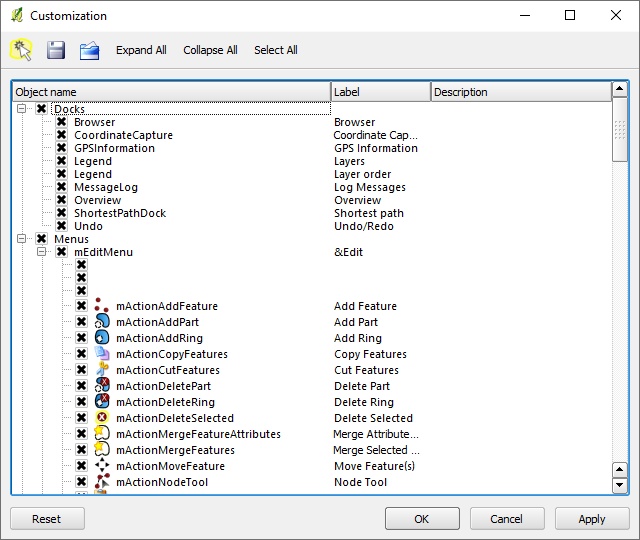
This branch also contains Martin and Radim’s work on a QGIS interface customisation tool. The new dialogue allows you to hide unnecessary widgets and save these settings to a file for use on other machines.
QGIS UI customisation tool
Not only can you hide individual buttons on toolbars and toolbars themselves, but literally anything can be customised. For example, you can remove menu items, hide individual tabs, or dialogue controls.
What has been talked about for a long time has happened. The QGIS project has officially changed its version control system: the code has been moved from SVN to GIT. The migration process is described in detail in Tim’s blog.
This is the second global migration. A few years ago, we migrated from CVS to SVN, and that was accompanied by the migration of the repository and bugtracker from SourceForge to the OSGeo infrastructure. The current migration is even more global: in addition to the migration to GIT, we have a repository migration to GitHub (more on that below), a bug tracker change (Trac will be replaced by Redmine), and we will also create a new plugin repository integrated with the bug tracker.
The new official repository is on GitHub — qgis/QGIS. As git is a distributed version control system, access to the main repository will be restricted to a few developers (i.e., many developers who previously had access will lose it). Everyone else can work in their own repositories and either submit patches (created using git format-patch) or send a pull request (if your repository is also on GitHub).
Now a bit of grumbling. The move to Git is a good step, but I personally don’t like the fact that the official repository is on GitHub. I don’t understand why the repository can’t be on the OSGeo servers. The rest of the infrastructure will be there anyway, so everything will be interconnected, and a single login will be used to access all services (bugtracker, svn, ftp…). Now it is not very convenient, and there is also a dependency on a third party.
P.S.: despite the fact that version 1.7 has already been branched, the release will be delayed until the end of the project’s infrastructure update. The release branch is accepting fixes that do not affect strings, and package maintainers can already prepare test builds and make the necessary changes.
OSGeo4W is a special installer focused on the distribution of various free and open-source GIS software on Windows operating systems (XP, Vista, etc.). With OSGeo4W you can install GDAL/OGR, GRASS, MapServer, OpenEV, uDIG, QGIS and many other packages (see the full list).
Installing OSGeo4W requires only a few simple steps:
the selected packages and the required dependencies will be downloaded and installed automatically
After installation, desktop applications can be started from the “Start → Programs → OSGeo4W” menu. Command line utilities can be run from the OSGeo4W Shell, and web applications will be available at http://localhost/.
In this post, I will go through the main steps needed to prepare and add a new package to OSGeo4W, based on my experience of creating packages for matplotlib and TinyOWS, and information from the OSGeo4W Wiki.
Not long ago I wrote about the raster calculator in GDAL. It is a useful tool and has enough functionality to solve most tasks. But as it turns out, it is not without its bugs.
I was playing with this calculator and looked at the code. Almost immediately I noticed that it reads data “as is”, which was something to worry about, as I had already stepped on that rake some time ago (/me is immersed in memories for a few minutes. It was a fun time: two parallel projects, both related to GDAL; lots of new stuff to learn…). A little test confirmed my fears. Here is the result of an NDVI calculation for a Byte raster, performed with RasterCalc and saved as Float32.
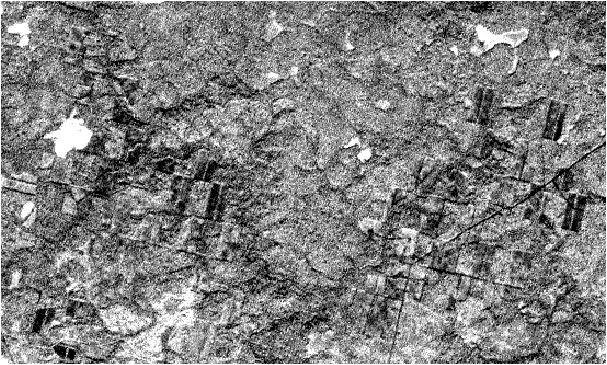
NDVI calculated with RasterCalc for inputs with Byte data type
And this is the result of the same operation performed by gdal_calc
NDVI calculated with gdal_calc for inputs with Byte data type
You can’t get this across with an image, but the white areas aren’t really white at all — they contain a NODATA value.
What can I say, the results are very interesting. But the explanation is simple: since the data is read “as is”, when performing arithmetic operations, you can run into things like integer overflow and rounding of the result (in Python, the result of dividing two integers is also an integer).
Obviously, this is a bug. So let’s write to the author, report the issue and propose a patch.
If you are using this tool, you may not want to wait for the next version of GDAL and fix the bug yourself. To do this, open gdal_calc.py in your favourite text editor and lines 230–232
TinyOWS is a lightweight and fast WFS-T server. OSGeo4W is an installer for various free GIS software. What do they have in common? Until today, the correct answer was “nothing”.
From today, OSGeo4W users can install and use the latest version of TinyOWS 1.0.0rc1. Previously, the only reasonably easy way to get the TinyOWS server running on Windows was to use MS4W installer, but it provides the old 0.9.0 version.
I have also written a guide on how to build TinyOWS on Windows.
A small tutorial on how to build the current version of TinyOWS (the so-called trunk) under Windows XP Professional using Microsoft Visual C++ 2008 Express Edition and libraries from OSGeo4W.