Quite often, I have come across the question: How can I use the georeferenced rasters (raster + map file) from OziExplorer in QGIS? In order to use such data in a GIS, it is usually necessary to convert them first, e.g., with GlobalMapper. With the release of GDAL 1.7.1, there is no need for proprietary software, as GDAL now supports OZI map files.
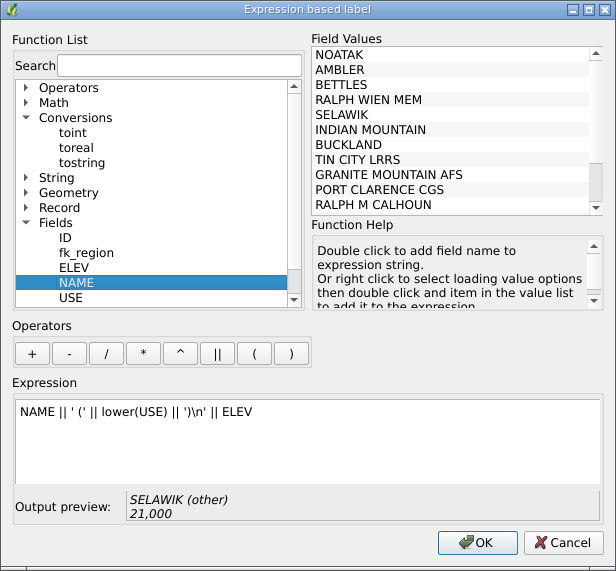
Just three hours ago, a patch by Nathan Woodrow was added to QGIS that allows expression-based feature labelling.
Expressions support basic arithmetic operators, parentheses, string functions, type conversion functions, etc. There is also an expression builder dialogue where you can:
search functions by their names
check expression validity as you type
preview expression results in real-time
read a short description of the selected function (currently only available for some functions)
load the first 10 unique values or all field values from the context menu
Julien Malik has announced the release of a new plugin for QGIS that provides an interface to the Orfeo Toolbox tools. The new plugin is based on the Processing Framework and requires the OTB libraries and Python bindings in the system. For Windows, you can get the necessary files here. For Linux users, it is a bit more complicated, but the author promises to prepare packages for Ubuntu soon.
Over time, the list of available tools will be expanded.
As you know, GDAL 1.9 now supports ESRI ArcObjects (read only) and File Geodatabase (read and write). This means that after rebuilding QGIS with the latest version of GDAL, you will be able to work with these data sources. For Linux users, there is no need to rebuild QGIS; it is enough to make the correct symlinks.
GDAL is gradually moving towards full Unicode support: RFC 23 has already been implemented, and there are ongoing efforts to implement RFC 5.
Another step was the implementation of recoding of Shapefile attributes to UTF-8 when reading and from UTF-8 when writing. Except for that… the encoding is determined by reading the LDID (Language Driver ID) from the DBF header. In general, this is the right approach, but I can’t remember the last time I saw shapfiles with the encoding specified correctly. Mostly, there are files with LDID set to 87, which corresponds to the default value.
This is where the most interesting part begins. It is clear that this default is different for everyone. And in the current implementation, the LDID/87 value is interpreted as ISO8859_1 (Latin-1). The problem with this approach, I think, is clear to everyone. The proposed solution is either to edit the existing files and set the required DBF encoding or to override the interpretation of the LDID value by setting an environment variable. The first method requires more work (it is necessary to find out the encoding of each Shape file and write it in the DBF header), but it is also the most correct. The second one is actually an ugly workaround because, with this approach, only files in one, overridden, encoding will be read correctly. All others will still be displayed as unreadable garbage, which is unacceptable when using data in different encodings.
A few months ago, the question of integrating OSSIM into QGIS was raised. The discussion was interesting and active, the OSSIM developers even published some experimental code, but it all fizzled out.
One of the reasons, in my opinion, is that the developers of the OSSIM data provider published the code not as a normal patch but as a set of modified files. Moreover, all this was done not on the latest master but based on outdated SVN sources. Another reason is that, at the same time, we had an active discussion about a new Processing Framework, and its development started. And the possibility of integrating OSSIM through this framework was also considered.
I didn’t feel like writing a report for my contest work today, and I didn’t feel like working on an Android app either. So I decided to see what the guys from OSSIM had written. In general, it doesn’t look too bad, although there are a few questionable solutions. For example, for some reason, they invented their own class for saving settings, even though there is QgsOptions and a settings dialogue. I have tried to integrate their code into master. The results are in my fork on GitHub, branch ossim_provider. I haven’t tested it myself yet, as I haven’t found a pre-built OSSIM package, and it will take quite some time to build it on my laptop.
Giuseppe Sucameli has successfully completed his GSoC 2011 project — the DB Manager plugin for QGIS.
DB Manager combines the functionality of the PGManager, SLManager and RT_Sql_Layer plugins and supports SQLite/SpatiaLite and PostgreSQL/PostGIS databases (including raster support). With this plugin, you can:
view a list of database tables
view detailed information about the selected table
view data in tabular form and on a map
rename and delete tables using a graphical interface
execute SQL queries
drag and drop database tables (both spatial and geometryless) into your QGIS project
In addition, while working on the module, Giuseppe implemented the ability to import layers from one data source to another (commit 1a70dddca1). This allows you to easily import data from a shapefile into a PostGIS or SpatiaLite database, and vice versa. This functionality is available in both C++ and Python.
Besides Pascal bindings for GDAL, I also have Pascal bindings for Proj.4 — a library for working with coordinate reference systems.
But while in the case of GDAL there were no Pascal bindings at all, the situation with Proj.4 is much more complicated. There are Pascal modules for old Proj versions 4.4.3, 4.4.6 and 4.4.7 (by Alexander Weidauer), which I used as a starting point for my work. The FPC also has a built-in package (based on the newer Proj 4.6.1). Unfortunately, I found out about this package after I had written my module.
So now I’m asking myself, should I make my code public or not?
A long time ago, in a galaxy far, far away… Almost a year ago, I was involved in a project that is now almost dead. It was notable not only for its ideas, but also for the fact that its main development tool was Delphi. In my opinion, this was not the best choice: if you need ObjectPascal so much, you should use FreePascal, which supports 64-bit and is cross-platform, open, and free. But that’s not the point.
The GDAL library was supposed to be used to work with vector and raster data, but… As it turned out, there are no bindings for Pascal. There are bindings for Python, R, Perl, PHP and a few others, but not for Pascal. Well, there is a ticket in trac from 4 years ago, but the solution proposed there is basically a hack, because it requires changes in the GDAL code and a custom GDAL build. We had to do something… So I remembered my youth, remembered how I used to code in Pascal and tried to make a wrapper for the library.
I tried to keep the code compatible with both FreePascal and Delphi. Unfortunately, for various reasons, I did not manage to create a complete wrapper. Maybe when I have the time and resources, I will slowly add the missing bits. In the meantime, I have decided to publish the current implementation on GitHub. I hope someone will find it useful.
Following the news of the successful cross-compilation of QGIS on Android, QGIS was launched on the ASUS Transformer tablet (Android 3.2) and the Samsung Galaxy phone (CyanogenMod 7RC1).
At the moment, QGIS runs without some features (e.g., no Python support, not all providers are available, etc.), but the GUI is fully functional, although there are some problems using it on mobile phones due to the small screen size.
If you want to give it a try, there is a pre-built APK (note that you need to install Ministro and Qt first; the total download size is ~130 MB). There is also a compilation guide on the wiki.
Video of installing and running QGIS on ASUS tablet
I can’t stop being pleased with the popularity of RasterCalc. It is a very useful and, above all, functional tool. Today, the calculator has two new functions (the initial patch was provided by Ludovic Mercier): composeRgb and extract.
The composeRgb function creates a 3-band raster from individual channels. Example of use:
The output will be a 3-band raster: band 1 of the clearcuts raster will be used as the first output band, band 5 of the clearcuts raster will be used as the second output band, and the third output band will be the average of bands 5 and 6 of the clearcuts raster.
The extract function extracts a subset of bands from a multiband raster and saves it as another raster. Example of use (assuming the Clearcuts raster has 10 bands):
extract([clearcuts]@1, 3, [5,7], 10)
The output will be a multi-band raster consisting of channels 3, 10 and all channels from the interval [5, 7]. I.e. the output image will have 5 bands (bands 3, 5, 6, 7 and 10 of the input raster).
The implementation (even with my changes) is far from optimal, but I don’t have time for proper refactoring and optimisation. Maybe I will rewrite it completely later.