I continue to update and re-publish my QGIS plugins. Today marks another milestone: a new version of the Conefor Processing provider was just uploaded.
As this is one of my latest plugins, it did not require many changes: just some Qt 6 compatibility fixes and small touches to improve the user experience, such as adding help strings.
If you haven’t seen the initial announcement of the plugin and/or are not familiar with Conefor, here is a short overview.
Conefor is a specialized tool to quantify the importance of habitat areas and links for maintaining or improving landscape connectivity. It is widely used in spatial ecology and conservation planning as a decision-making support tool for prioritizing critical sites and evaluating how habitat fragmentation affects wildlife movement.
The plugin acts as a wrapper for the Conefor command-line tool and provides algorithms for input preparation and running analyses. Together with the Circuitscape Processing provider, this plugin forms a powerful suite of spatial ecology tools, helping researchers analyze anything from climate-induced species range shifts to gene flow and landscape permeability patterns.
While it remains unavailable to the general public because of the ongoing war in Ukraine, I still want to provide a quick update for those who are interested.
As part of my ongoing efforts to update and re-publish my QGIS plugins, I have just uploaded a new version of the prepair Processing provider.
Along with the fixes focused on Qt6 compatibility, this plugin also went through some refactoring driven by the changes in the latest versions of the prepair and pprepair tools and the availability of the native QGIS API to run external processes.
Just like with the Raster Transparency plugin, I realized I have never actually written about this plugin on the blog before. So, here is a quick overview.
prepair for Processing allows users to easily fix “broken” geometries using prepair and pprepair tools developed at TU Delft. It provides two algorithms, tailored to different cleaning goals:
fixing single broken geometries (like self-intersections or dangling edges) according to OGC Simple Features/ISO 19107 rules.
repairing a set of polygons to form a valid planar partition without unwanted gaps or overlaps.
The war continues. russia has not stopped. Our cities are still being bombed, and our people are still being killed. Nothing about that has changed and neither has my position.
However, I have decided to re-launch my plugins repository. I have realized that by keeping my work hidden I am allowing the aggressor to claim a small victory over my professional life and my contributions. My plugins were built to help people solve problems and work more effectively. And I want them to serve that purpose again.
This is not a return to “business as usual”.
If you are a russian, belarusian or iranian citizen or resident; if you believe this is merely “putin’s war”; if you do not recognize russia as an aggressor and occupier; if you refuse to condemn this aggression against a sovereign state; if you accept the false narratives of russian propaganda: my work is not for you.
By using any of my plugins or their source code for any purpose and in any form, you accept and uphold the following:
You acknowledge the absolute sovereignty and territorial integrity of Ukraine within its internationally recognized borders.
You condemn the russian unprovoked act of aggression and the systematic war crimes being committed on Ukrainian territory.
You reject the false narratives and dehumanizing disinformation produced by russian state propaganda.
You recognize the actions of russia as a campaign of genocide against the Ukrainian people.
You acknowledge the collective responsibility of those supporting, enabling, or remaining silent during this aggression.
You support the demand for a special international tribunal to hold all perpetrators and their enablers accountable.
You demand the immediate return of all Ukrainian citizens, including the thousands of children forcibly deported to russia.
You will seek alternatives to products developed by russian entities, recognizing that their revenue contributes to funding the ongoing genocide and that continued use normalizes russia’s actions.
To make this more prominent and explicit, the plugins will display a one-time reminder about these terms upon launch and after updates. My code will not be a silent partner to those who fund or ignore the war in my country.
I choose to keep my work alive. Not for the benefit of the aggressors, but for the global community that stands with us.
Photo2Shape was the next plugin I decided to update to support QGIS Qt6 builds.
As with the Statist plugin, I did not stop after fixing compatibility issues. I had been thinking about porting some of my plugins to Processing for years, and Photo2Shape was one of them. Although I am very comfortable with Processing and have developed many Processing providers, I always postponed the migration because the plugins were working fine, and there was always something more urgent. Then the war started, and my focus shifted completely. So Qt6 migration was the perfect opportunity to catch up and cross another item off my long TODO list.
This is how the new version of Photo2Shape was born. It is now a Processing algorithm provider with three algorithms for importing geotagged images, each powered by a different backend: GDAL, exif-py, and QGIS (exiv2). The backends vary in their support for different image formats and handling of missing EXIF GPS tags. The plugin’s main functionality remains unchanged. It still:
creates a point layer from geotagged images
adds maptips with image previews
applies a custom style to the output layer
assigns editor widgets to provide a nice UX when using the feature form
In addition to the point vector layer, it is now possible to generate an optional geometryless table containing information about any images that could not be processed, including the specific reason for the error.
Contrary to the Statist plugin, which was not only ported to Qt6 but also underwent refactoring and a UI update, this plugin received only minor changes focused on Qt6 compatibility. The main reason for this is that the QGIS API does not offer any new features that would benefit the Raster Transparency plugin.
While writing this post, I realized I have never written a word about this plugin on my blog. Let’s fix that!
Raster Transparency is a QGIS plugin designed to interactively define transparent pixel ranges for raster layers. While this can be done in the “Transparency” tab of the layer properties dialog, this plugin is more convenient. It integrates into the “Layer Styling” panel and allows you to adjust transparent pixel ranges using a dual-handle slider and/or spinboxes. The raster updates interactively as you move the handles or change spinboxes’ values, providing immediate visual feedback.
When QGIS Qt6 builds received stable Python bindings in early 2024, I began the process of updating my plugins. Since Statist was the first QGIS plugin I have developed, it was the natural choice to start with it.
Although the porting was completed almost a year ago, I haven’t announced the new version for both personal and global reasons.
The switch to Qt6 was straightforward and mostly involved fixing imports and enums handling. However, this was also a great opportunity for refactoring, code cleanup, and UI polishing, which I could not pass up. So, I switched from a custom worker thread implementation to QgsTask, aligned the user interface with the native QGIS Statistical Summary panel, and improved the appearance of the frequency distribution plot when using a dark theme.
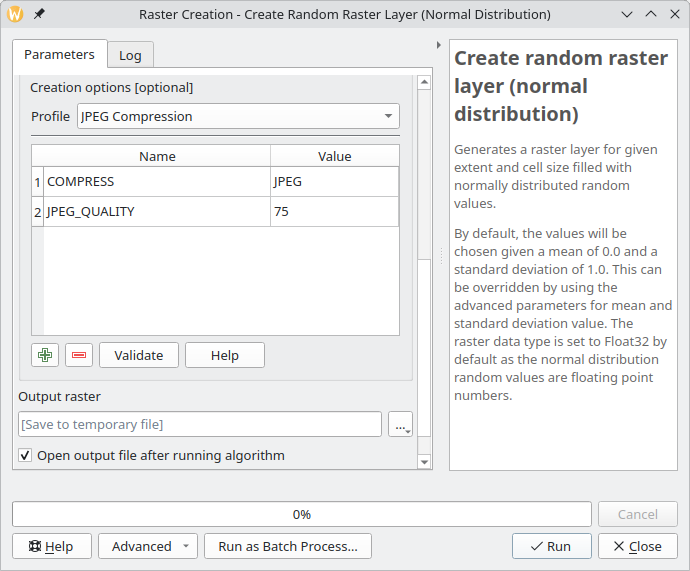
As you probably know, QGIS support for raster data (both reading and writing) is based on the GDAL library. One of the essential parts of raster handling is support for raster creation options — parameters that control specific details of the created file. For example, the GeoTIFF driver has options to control compression and whether the file should be tiled.
QGIS already allows setting these options when exporting raster dataset, GDAL algorithms in Processing of course, also support them. And not that long ago, I have implemented a corresponding widget wrapper for Processing and updated most of the native raster algorithms to support raster creation options out of the box.
Raster creation options in a QGIS Processing algorithm
However, there are more places in QGIS that could benefit from the creation options support, and I have recently started working in this direction. First, as a part of the QGIS bugfixing efforts, I updated the grid writer class used by QGIS’s native interpolation code to use the QgsRasterFileWriter API instead of writing output in the ASCII Grid format. This change not only allowed interpolation results to be saved in any GDAL-supported format but also paved the way for support for creation options and custom NODATA value.
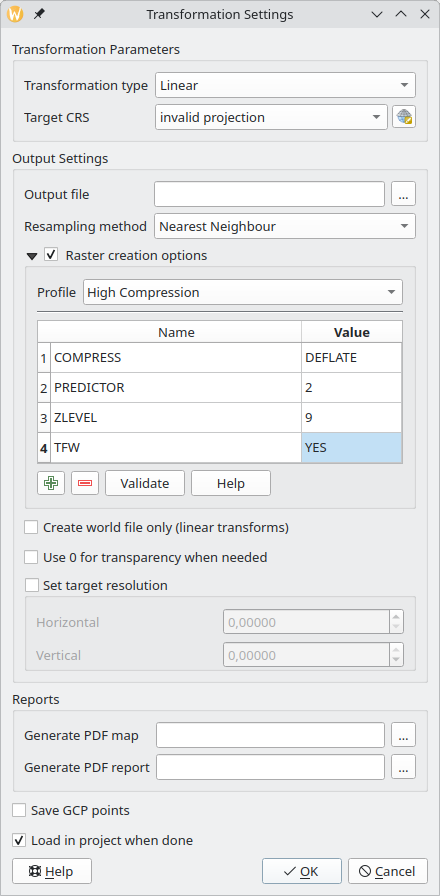
The next step was the georeferencer. While the original ticket, I was working on, was about support for the BIGTIFF option, I decided to implement a more comprehensive fix and added full support for creation options.
Raster creation options in the QGIS georeferencer
After that, now in my spare time, I continued to improve the support for creation options in various places in QGIS. With the QgsGridFileWriter using the proper API, it was not too hard to implement support for custom NODATA values and creation options. For now, this is still an API-only change, as the Processing algorithms using this class are written in Python and have some known issues. I would rather wait and expose new functionality when porting them to C++.
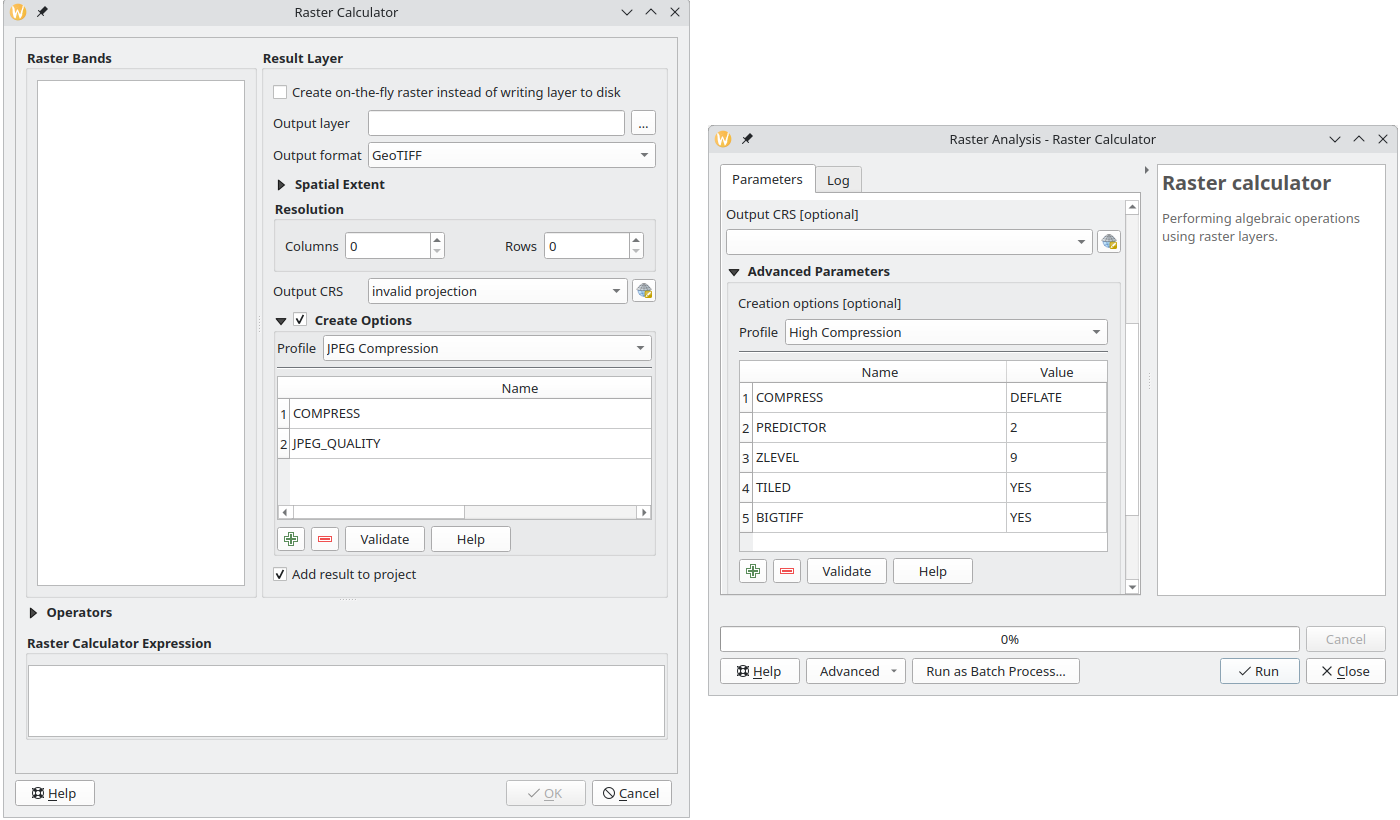
My latest contribution is related to the QGIS Raster Calculator. After adding API to set creation options and change the NODATA value, I have also exposed this functionality to the UI both in the native tool and Processing algorithm.
Raster creation options in QGIS raster calculator (left — native tool, right — Processing algorithm)
I hope all these changes will make your raster analysis workflows easier and more productive, and output files smaller and faster to load.
Do not hesitate to contact me if you have any suggestions related to raster creation options support in QGIS.
OpenLitterMap is a citizen science project that aims to create a comprehensive, open-access database of litter and plastic pollution around the world. The data collected by the project are freely available to anyone for any purpose, including research, analysis, and advocacy. However, in order to access the data, one must manually construct a request and query the server. This is where OpenLitterMap for Processing comes in. The plugin allows you to select an area of interest on a map, specify a year for which you want to download data, and get a result.
I haven’t done this kind of summary post for a while, and I think it’s a good time to start doing them again.
This year has not been an easy one. It was full of hardships, losses, dramatic changes, and dashed hopes. All these things were draining almost all my attention and energy, leaving me nearly without any possibility to work on something I would like to, despite my efforts to return to normal.
While I was not able to work on QGIS as much as I would like, I still managed to contribute some bugfixes and new features, namely:
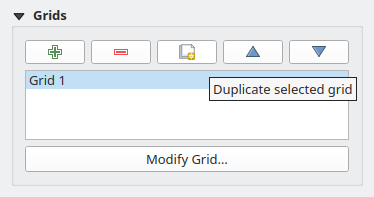
a small feature allowing you to duplicate the composer grid in one click (Giovanni indeed had an itch, as one blogger wrote, and he mentioned it a couple of times. But the truth is that he never asked nor hired me to do something. It was entirely my own initiative to implement this functionality and a few other fixes/improvements as a gift for a good friend)Duplicate Composer Grid functionality in QGIS Composer
added support for overriding widget wrappers in Processing (something that bugged me a lot as I used to use Processing extensively)
implemented a native widget wrapper for GDAL raster creation options and updated most of the core raster algorithms to support raster creation options out of the box (another item from my long TODO)
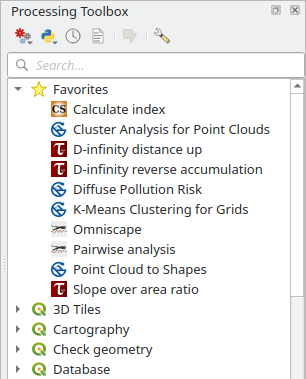
added support for marking Processing algorithms as favorite algorithms for easier discoverabilityFavorite algorithms in QGIS Processing Toolbox
fixed a bug in the QGIS Browser metadata search functionality that made it unusable in some cases and added a couple of smallUX improvements
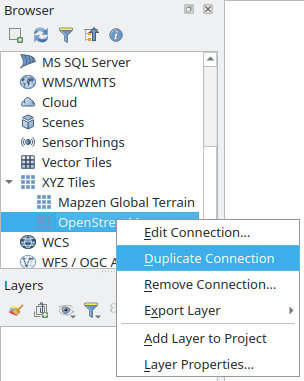
a small feature allowing you to duplicate any connection in the QGIS BrowserDuplicate Connection functionality in QGIS Browser
added a setof tools to Processing to deal with layer metadata (extract layer metadata to a QMD file, populate layer metadata from a QMD file, copy metadata from one layer to another, combine layer metadata with the metadata of another layer, set and clear some basic metadata fields such as Title, Abstract, Identifier, etc., add new history entries to a corresponding metadata field)
ported Basic Statistics Processing algorithm to C++ and added a small improvement along the way
another small feature to allow creation of empty GeoPackages from the QGIS Browser
For some people, this list may look big, but it is actually not. Of course, I’m happy that I was able to do all this, as it is better than nothing. Still, it is far behind my previous level of involvement in the project.
I also published one QGIS plugin — OpenLitterMap — to download data from the eponymous project. Nothing special, just a small Processing provider with a single algorithm for now. The plugin is a bit limited as the parent project lacks a proper API, but I will try to keep an eye on it and update and improve the plugin when the new version with the API is released.
There were a couple of other specialized plugins I developed for clients. One integrates a landslide modeling tool, utilizing the Smoothed Particle Hydrodynamics (SPH) approach, into QGIS and the other implements a set of validation rules for fiber optic networks. Since both plugins are not of interest to most users, I decided not to write about them in detail here. Maybe one day I will write a separate post about the challenges and problems I faced while working on these projects.
Unfortunately, my own plugins and projects had almost zero activity, and I really need to do something about that.
As for the rest of my life, it’s too early to draw any conclusions, as I’m still in the process of understanding things and adapting to the new situation. There are still a lot of issues to resolve and things to handle, from work-related problems to personal life.
I hope that the next year will be more active and positive, with new projects and professional challenges, events and travels, new connections and experiences.